| |
|
|
|
 |
NNS ADix v3 - Active Directory® Import/Export Tool
|
| |
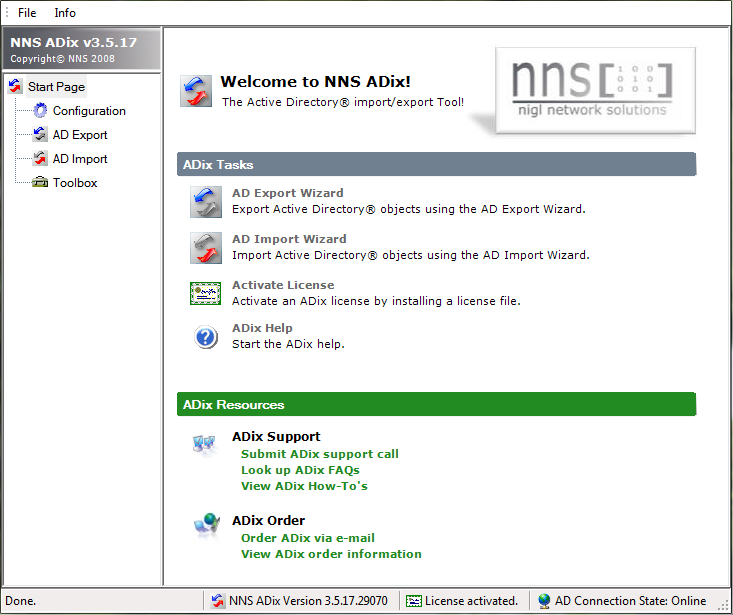
NNS ADix v3 is a tool for Active Directory(R) bulk import/export. |
| |
With NNS ADix, administrators can make bulk
changes to Active Directory, exchange data
between Active Directory and other systems (e.g.
databases, directory services or HR-applications)
on a recurring basis.
Furthermore NNS ADix contains some useful
features which enables you to quickly recover
deleted Active Directory objects, manage
Terminal Services-related attributes, retrieve
the last logon time of a user and many more ...
Program Information:
|
| |
Feature Overview |
| |
NNS
ADix v3 contains the following key features:
- Import Active Directory® objects:
Import Active Directory® objects like users, groups, ... from a text-based file.
Create new objects or change properties of existing objects.
- Export Active Directory® objects:
Export Active Directory® objects like users, groups, ... into a text-based file.
- Wizard-driven import/export of Active Directory® objects:
The Import/Export Wizard helps you to import or export Active Directory
objects.
- Query Filters:
Query Filters are used for export operations. Specify LDAP queries,
preview the result of a query and save this queries for later use.
- Extended Object and Attribute Data:
Get extended data for an Active Directory object when viewing the properties
of the object. The extended
data provides information like attributes and attribute values of an object,
whether an attribute is ...
... part of the GC,
... is multi-valued,
... is a system attribute,
... and further more.
- Active Directory® Browser:
Display and select branches of your complete AD forest.
Display attributes
and attribute values of an object using the AD Browser.
- Job Definitions:
Save the settings you have made using Export-/Import Job Definitions. Start these jobs at any time you need it.
If you want to run export/import jobs on a recurring basis, simply schedule
these jobs.
- Tombstone Reanimation:
Reanimate Active Directory® tombstones (deleted objects) in seconds.
- Import or Export Terminal Services (Remote Desktop Services)
Related Attributes:
With NNS ADix we provide a convenient way to export/import Terminal Services
related attributes, although these attributes are not part of Active
Directory.
- Get the Domain Last Logon Times of Your Users:
Easily get or export the (real!) last logon time a user logged on to the
domain.
- Import or Export
Pictures:
Import pictures directly
from files to Active Directory®.
Export pictures from Active Directory®
to JPEG-formatted files.
- Improved NNS ADix GUI:
The NNS ADix v3 GUI helps you to better organize Query Filters, Job
Definitions and so on.
.top
|
| |
System Requirements and Setup |
| |
In order to install and run NNS ADix v3,
the following system requirements must be met:-
Supported Operating Systems:
Windows XP, Windows Vista, Windows 7, Windows 8, Windows 8.1,
Windows Server 2003, Windows Server 2008, Windows Server 2008 R2,
Windows Server 2012, Windows
Server 2012 R2
- Software Requirements:
- The Microsoft .NET Framework 2.0 must be installed on the computer where
NNS ADix will be
installed
- In order to install NNS ADix, you must have administrative permissions on
the computer where
NNS ADix will be installed
- Access to a Microsoft Active Directory Domain for post installation tasks
must be possible
-
Setup:
Expand the contents of the downloaded zip-file into a temporary
directory and run Setup.exe.
Follow the steps provided by the setup wizard.
.top
|
| |
License Information |
| |
Please allow for this information before
purchasing a license:-
Product Activation:
NNS ADix is distributed as fully functional but time limited
evaluation version. Download
and install the public
license file. By
applying the license data to your
evaluation
version, you turn it into an unlimited one
('Activate License').
- License Model:
NNS ADix is for free. You can download the public license file and
use it on an unlimited number of computers.
.top
|
| |
|
|
|
|